Pages

Showing posts with label Credit cards. Show all posts

Tuesday, August 21, 2012

Visually Reinforce Your Credit Card Fields

During our checkout usability study we noticed that many test subjects didn’t consider security until they had to enter their credit card details. However, we also made another and far less obvious observation: several test subjects talked about certain parts of the checkout page as being “secure” and “insecure”.
For example the parts of the checkout page with security icons, badges or text and a general “robustness” were perceived as being more secure, while parts without these visual clues inspired less confidence – despite the fact that these fields were all part of the same form on the same page. From a technical perspective this of course doesn’t make any sense, as all the form fields on an HTTPS-page are equally encrypted. However, most people don’t know this and will perceive some parts of your checkout page as more secure than others, whether it’s logical or not.
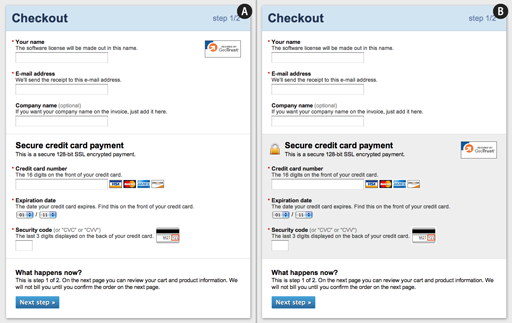
Mockup of how to visually reinforce a checkout process.

By adding visual clues (such as borders, a background color, and security icons) to the credit card form fields on your payment page you can increase the perceived security of those sensitive fields and make your customers feel more comfortable in handing over this information.

89% Get it Wrong

As of April 2012, a whopping 89% of the top 100 grossing e-commerce sites didn’t visually reinforce the credit card fields during their checkout. While a lot of the sites featured security badges on the payment page (SLL, Hacker Tested and similar) these badges and instructions weren’t placed in close proximity to the the credit card fields. Instead these security indicators were typically located in a sidebar, a navigation header or the site footer.
Only 11% visually reinforced their sensitive fields to some degree by either visually encapsulating the fields, or by positioning security badges in close proximity. Let’s take a look at those sites and see what they did right.

Examples From the 11% That Utilize Visual Reinforcement

One way to increase the perceived security of sensitive fields is to visually encapsulate them. This can be achieved by the use of borders, background colors, shading, and other visual styling that will make one part of the form seem more robust than the rest. Office Depot is one examples of how to do this:

Office Depot checkout process.

It’s important to note that if you use a similar style elsewhere during your checkout, but for less sensitive information, it will likely be considered generic styling and not yield the desired uptick in perceived security. So in order to achieve the effect of visual encapsulation it must be distinct and unique for your credit card fields (or whatever sensitive fields it may be).

When it comes to the positioning of security badges, placing them in close proximity to the credit card fields will generally increase the confidence in those fields. Peapod is a good example:

Peapod checkout process.

By placing the security badges in very close proximity to the credit card fields the customer is reminded that the form is secure at the exact time they start to worry about security – a strategically placed symbol of credibility to soothe the anxious customer. Furthermore by placing it close to those fields, and not in a generic place like the header or footer, the sites are also implying that the VeriSign logo apply to those fields in particular (although it’s technical nonsense).
Only one site out of the top 100 grossing e-commerce sites managed to do both visual encapsulation and place the security badge close by the credit card fields: Eddie Bauer.

Eddie Bauer checkout process.

Eddie Bauer utilizes the concept of visual reinforcement by both visually encapsulating their credit card form (with a border and a background gradient) and by positioning their security badge within the encapsulated form.

Technical Security vs Gut Feeling

Technically, there was no difference in security between Eddie Bauer and the 89% of the top e-commerce sites that didn’t visually reinforce their payment fields. But when designing your payment page you have to consider that most customers don’t have any technical understanding of web forms, PCI compliance or Secure Socket Layer (SSL). Instead the customer must rely on her gut feeling and determine if your website seems secure or not.

As we’ve seen it’s fortunately a relatively simple procedure to lift the perceived security of sensitive fields in your form – simply encapsulate the fields with a border or background and place your security badge nearby.

Thursday, March 1, 2012

What is Platinum Credit Cards

Platinum credit cards are some of the most prestigious credit cards to carry in your wallet. These credit cards signal to everyone that you have significant spending power based on your earnings and your history of credit score. The creditors realize that customers like you have the pick of the litter when it comes to choosing credit cards so they are willing to offer above average rewards and rates to get your business. As you peruse these offers there are several things you should consider before you decide which platinum card is best for you.

For many people platinum credit cards are a symbol of success. They are proof to the world that you have reached a particularly high threshold in terms of earnings and credit score worthiness. In addition to this distinction platinum credit cards offer a variety of benefits and rewards that are not available to owners of less valuable credit cards. The saying you get what you pay for applies when it comes to these credit cards. If you have done the hard work necessary to earn a huge salary and maintain an excellent credit score worthiness you get paid for that through the use of these credit cards.

In particular owners of platinum credit cards are paid with a low interest rate and a high borrowing limit. Together these two things allow you more freedom in spending. Freedom you earned because your bank card company trusts that you have the means to repay your debt by virtue of your revenue and because you have repaid debts in the past. Platinum credit cards are not available to everyone, but even if you think you might not qualify you should do a bit of research on them so that you have a goal to work towards and an understanding of what maintenance of your credit score rating can do for you.

Monday, February 6, 2012

Know about your Credit Card CVV Numbers


It is important and advisable to know what is credit card CVV number and how we going to use this while making any online transcation via internet.

Know about your Credit Card CVV Code and stay safe from the misuse of credit cards against fraud/unauthorised transactions. 

There are many types of credit cards available in the market. Before making any online purchase, We first need to understand the various terms of credit card security codes like CVV1, CVV2, or CVC2. CVV1 is present on magnetic on magnetic strip of the card, however the CVV2 or CVC2 is not present on the magnetic strip and this one is really necessary when “when card is not present” means that the transaction is carried out through internet globally from anywhere.

For reducing Credit Card fraud in the card-not-present environment, credit card companies are using card code program: 
  • VISA calls this code as code Card Verification Value (CVV); 
  • MasterCard calls this code as Card Validation Code (CVC);
  • Discover calls this as Card ID (CID)

The card code is a  three- or- four-  digit- code that is printed on the back of your card. For Visa, Master Card and Credit Card, the code is the 3 digit code to be found on the backside of your card on or above signature panel. For American Express card it is the 4 digits on the FRONT above the end of your card number.

When we use this cards while making any online transaction, we require to enter the credit card CVV number before making an order via internet. One should not be confused with the standard account number appearing in embossed or printed digits. Some people confuse with card’s PIN or passwords with mastercard, securecard, and verified visa. These codes are not printed on card as its confidential codes, manually entered at the time of transaction.

It is clearly adviseble one should not down the card somewhere or by heart or write down somewhere which is beyond anyone’s else reach and then cross down the CVV code with pen or pencil. This is because your card is visible to all, so when you leave your card unattended, so if the malicious person notes down your credit card CVV number along with card number and he/she can carry out a lot transactions without your knowledge, and you have to pay off those transaction when you fail to prove those transatction not really made by you.

So if your credit card CVV code is safe then ultimately your card is also safe, and nobody will not able to make any unauthorised fraud online transactions from your card. That’s the beauty of your credit card cvv code. Stay Safe!


Please leave any additional doubts in the comments section!

Friday, February 3, 2012

How Many Types of Credit Cards

Hello again, Do you know how many types of credit cards are really available in the banking world? Before, purchasing or moving ahead for buying the credit card you first need to understand Which card is really fits to your needs, for that we are giving you a brief about that. There are various types of credit cards available for you in the baking world depending on your needs. Let’s check out few of your options.

Here they are,


Business Credit Cards:

Business Credit cards presents business owner to keep personal expenses separate from it. The credit card gives you special reward points and saving opportunities than the normal individual/personal credit card holder. It allows you to keep track your outgoing money with special expense management service to run your business successfully. You may have one or more cards for your employees who needs for travel expenses with higher credit limit than normally you would own for your individual credit card.

Student Credit Cards:

Some credit card companies issue student credit cards that have lower limits and fewer incentives to help them for spending in hostel or college expenses; still I’m observing that many college students having a credit balance avg. between $3,000 and $7,000 and with some interest rates, this can make a real while trying to pay off.

Credit Cards for Bad Credit:

Sometimes it is possible, even with bad credit to have a credit card. These cards come with few restrictions not usually found on other types of cards. In that, your credit limit will be lower and interest rate may be higher than usual. Some may require you to have a secure credit card, meaning you have to maintain a savings or some other type of account that will cover the expenses for your credit card.

Cash Back Credit Cards:

Some credit card companies offer you cash back benefits for using their credit cards. It depends on how much your balance is and how often you use this credit card; you can earn cash back for your purchases. Some Companies offer 1% reward while others. If you are planning to purchase from your credit cards, cash incentive is a smart choice for you!

I hope I got cleared all your doubts for choosing your suitable credit cards.

Please leave any additional doubts in the comments section!